
TimeFence: website blocker with daily time limits
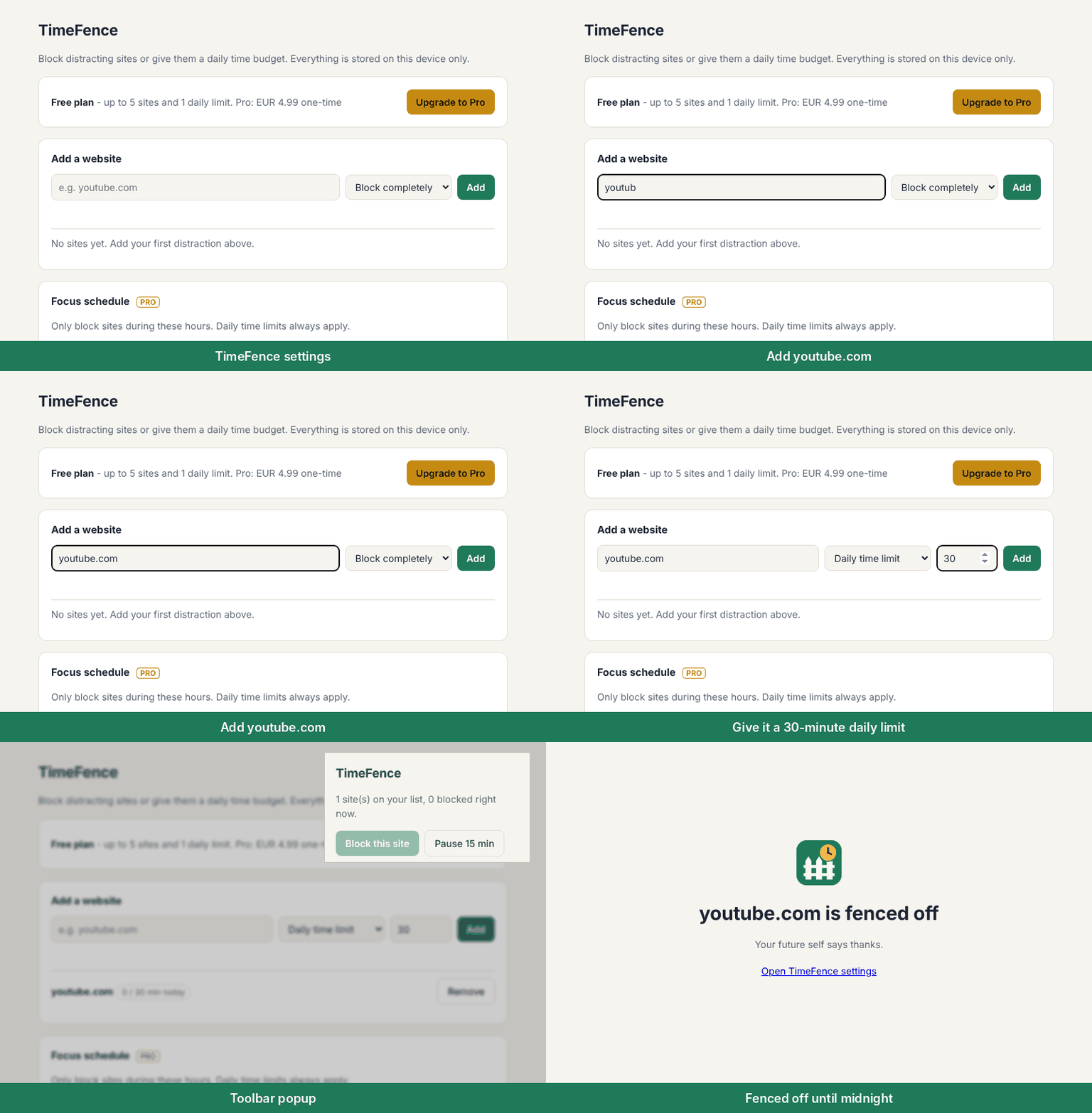
Block the sites that pull you away, or give them a daily time budget, like 30 minutes of YouTube a day. When the time is up, the fence goes up until midnight. For Chrome on your computer. No account, no tracking.
Add TimeFence to Chrome, free (opens chromewebstore.google.com)
Free
- Block up to 5 websites. Subdomains are included, so blocking youtube.com also blocks m.youtube.com.
- 1 daily time limit, for example "YouTube: 30 minutes a day". When the minutes run out, the site is blocked until midnight.
- Time counts once a minute for the tab showing in the Chrome window you used last, and only if you have used the mouse or keyboard in the last 60 seconds. So a video you watch for more than a minute without touching anything counts as time away and is not counted.
- A "Block this site" button right in the toolbar.
- A 15-minute pause when you really need it.
- A calm block page that says why the site is blocked and when it opens again. No guilt-tripping, no ads.
TimeFence Pro: $4.99, one time
No subscription. Everything that is free stays free.
- Unlimited blocked sites and unlimited daily time limits.
- Focus schedules: block sites only during the hours and days you choose. Overnight windows work too, for example 22:00 to 06:00.
- Lock until midnight: once locked, you cannot remove sites, pause or change the schedule for the rest of the day. There is no password to forget; unlocking early means asking and then waiting 15 minutes.
- Weekly view: minutes spent on each site on your list, day by day, for the last 7 days.
- Already paid on another computer? Use "Restore purchase".
Private by design
TimeFence has no servers, no accounts, no analytics and no ads. Your site list and your minutes stay in your browser, on your device. The only thing it ever asks the internet is whether Pro was bought, through the payment service ExtensionPay. Blocking uses Chrome's built-in blocking engine (declarativeNetRequest), so it is fast and light. Details: TimeFence privacy policy.
Why the permissions?
- Access to the sites you add: TimeFence does not ask for access to all your websites. When you add a site, Chrome asks you once to allow TimeFence on that site only, so it can show the block page there and count time on it. TimeFence never reads what is on the page.
- Block content on any page: Chrome's built-in blocking engine, used only for the sites on your list.
- Storage: keeps your settings on your device.
- Active tab: when you open the toolbar popup, TimeFence reads the address of the current tab, so "Block this site" knows which site to add. The address is kept only if you click that button.
- Alarms and Idle: count time once a minute, and only if you have used the mouse or keyboard in the last 60 seconds.
Questions
Can I give a website a daily time limit instead of blocking it?
Yes. Add the site, choose "Daily time limit" and set the minutes. When they run out, the site is blocked until midnight. The free version includes one daily limit; Pro has no limit on how many. Step by step: how to limit YouTube time on Chrome and how to limit Reddit time on Chrome.
Do I need an account?
No. Install TimeFence from the Chrome Web Store and add sites straight away.
Does TimeFence track my browsing?
No. To count time it checks which site is in the active tab once a minute, and that count stays on your device. It never reads page content and never sends web addresses anywhere.
What happens when I want a break?
You can pause blocking for 15 minutes. With the lock on (Pro), pausing and removing sites wait until midnight, or until 15 minutes after you ask to unlock.
Does it work on phones?
No. TimeFence is a Chrome extension for Chrome on a computer (Windows, Mac, Linux and ChromeOS).
Get TimeFence free on the Chrome Web Store
Questions or ideas: hello@ideasandfinds.com · Privacy